Product overview
A markdown collaboration tool that keeps the file the source of truth.
Comment on the words you're reading, not the syntax underneath them. Keep every version, forever. Review changes without learning a tool first. Markdown is the heart of it, and HTML dashboards and JSON data live in the same workspace — all as plain files that never leave your disk.
Commenting
Comment on markdown the way you actually read it.
Highlight the formatted words on the page, not the raw syntax or a diff line. DraftMesh anchors the comment to that text span, so it survives edits to the prose around it.
No mapping rendered text to diff lines
GitHub pull requests make reviewers translate formatted prose back onto raw markdown diffs. That translation step is where reviewers give up.
Comments don’t vanish on edit
Confluence comments disappear when a page is edited or retitled. A DraftMesh comment stays attached to its text span through ordinary edits nearby.
Anchored, not line-numbered
The anchor is the quoted text itself, so a comment survives reformatting, reflow, or a paragraph moving elsewhere in the document.
Launch Readiness Checklist
Support needs two business days of lead time before the public announcement goes out.
Priya · Support lead
Make it three days — we still need to brief the on-call rotation.
Version history
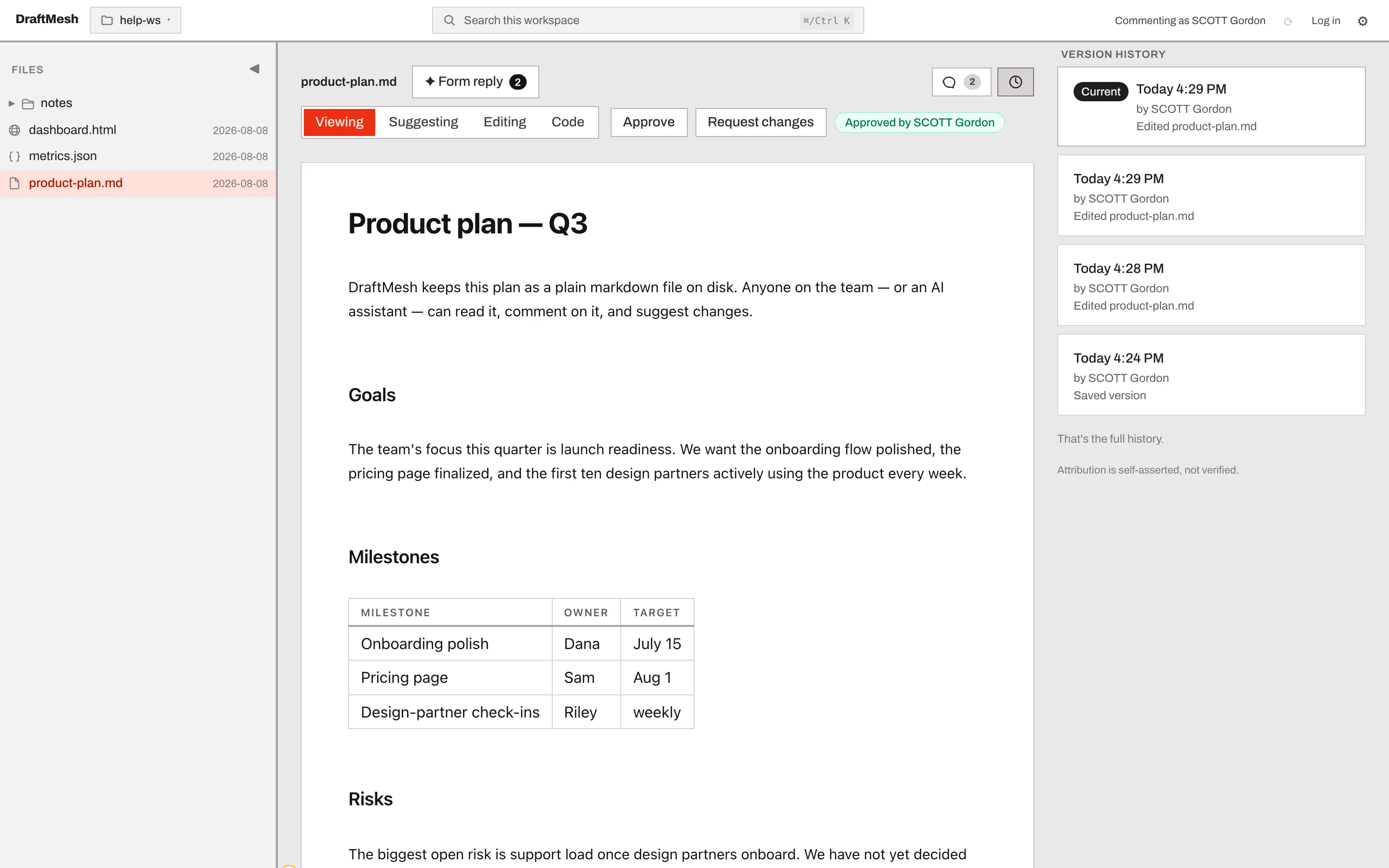
Never lose work, even when two people edit at once.
Every version is kept automatically. Roll back to any earlier version in one click. When two edits collide, both survive and you're told — never a silent overwrite.
01
Every version kept
02
One-click rollback
03
Collisions surface, they don't overwrite
Suggested edits
Propose a change. The owner approves or rejects it in one click.
Suggested edits work like comments: they attach to the document without touching the live text until someone with ownership signs off.
How a suggestion moves through review
History & rollback
Real version history, described in plain language.
Durable, complete history of every document — presented as versions, restore, and review. There is no second vocabulary to learn before you can use it.
Versions, with names and times
Restore is one button
Review is comments, not code
Approvals pin to a version
Beyond prose
Send stakeholders a live dashboard and let them comment on it.
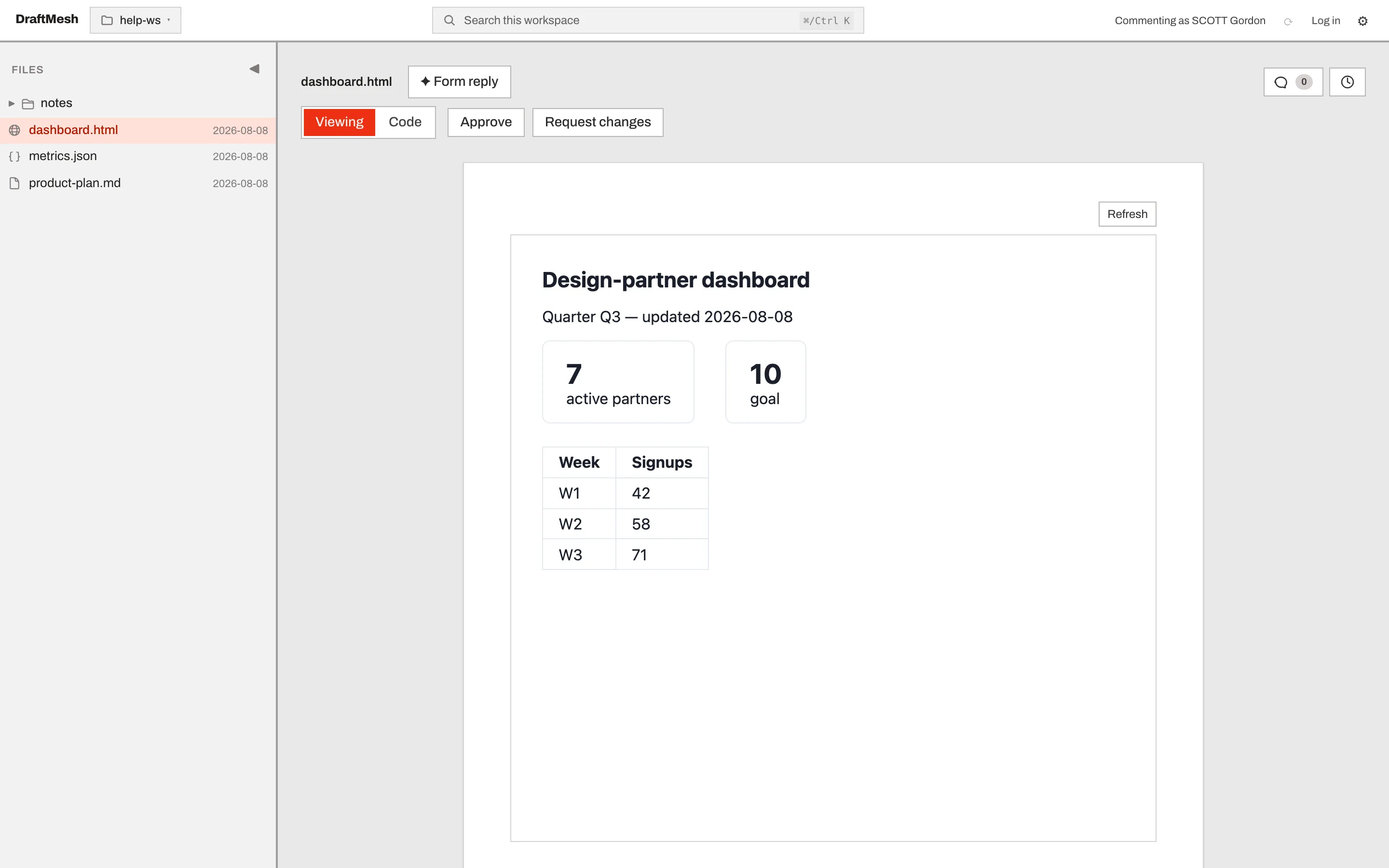
Markdown is the heart of DraftMesh, but a workspace holds two other kinds of file. An .html document renders as a real page — a dashboard, a report, a business case — and people can comment on the rendered result. A .json file holds the numbers behind it.
HTML renders, and takes comments
The page renders inside a sandbox — styles and scripts work, but it cannot reach outside. Reviewers highlight the rendered content and comment on it, and the document can be approved like any other.
JSON is the data underneath
A data file opens as a browsable tree. DraftMesh refuses to save invalid JSON — from you or from an agent — so a typo cannot silently break the dashboards reading it.
The page updates when the data does
An HTML document can read JSON from its own workspace and re-render the moment the file changes. Edit the numbers in DraftMesh, from a script, or with an agent; every open page follows.
Versioned exactly like prose
All three types carry full history, so "who changed this number, and when" has the same answer as "who changed this paragraph".
Being exact about today: markdown is the only type that takes suggested edits, HTML takes comments and approvals but is edited as code, and JSON carries history alone — data is not prose, so it holds no comments. The full matrix is in supported file types. Three types is where we are now, not where we intend to stop.
Your files, your disk
Plain files, no database, no export step.
Your documents live in a folder you choose. DraftMesh reads and writes the same ordinary .md, .html and .json files any other tool can open — and on markdown, the comments travel inside the file itself.
01
Portable by construction
02
Offline-first
03
Comments live inside the file
Offline-first
The local app has no network dependency at all.
This isn't offline tolerance with a sync queue behind it. There is no network call in the free local app's document path — airplane mode, an air gap, or dead Wi-Fi all behave identically.
Questions about how DraftMesh works
How is commenting different from GitHub or Google Docs?
GitHub PRs force you to map rendered content back onto raw diff lines — reviewers who don’t read markdown syntax fluently give up. Confluence comments vanish when the page is edited or retitled. DraftMesh anchors comments to the rendered text span itself, so they survive edits to the surrounding prose.
What happens when two people edit the same document at once?
Both edits survive. DraftMesh never silently overwrites one person’s work with another’s. When two changes collide, you’re told, and you resolve it — nothing is dropped without your knowledge.
Do I need to be technical to use version history?
No. You see a list of saved versions with an author and a time on each, and a button that restores one. That’s the entire vocabulary — nothing borrowed from developer tooling, and nothing to type.
Where do suggested edits and comments actually live?
Inside the markdown file itself, as invisible HTML-comment markers. There’s no separate database record that can get out of sync with the document — send the file to someone else and the comments go with it.
Does DraftMesh require an internet connection?
The local app has no network dependency at all. It reads and writes files on your disk. Airplane mode, an air-gapped machine, or a dead Wi-Fi connection all behave identically.
Will my documents still be plain files if I stop using DraftMesh?
Yes. There is no export step, because there is nothing to export from. Your files were already ordinary .md, .html, and .json files in a folder you chose — uninstalling DraftMesh leaves them exactly as they are, comments and all.
Can I do this with anything other than markdown?
Yes, with two other file types today. An .html document renders as a real page inside a sandbox — a dashboard, a report, a business case — and reviewers can comment on the rendered result and approve it, though it is edited as code rather than as prose. A .json data file is versioned and browsable, and an HTML page can read it and re-render live when the numbers change. Only markdown takes suggested edits, and JSON deliberately carries no comments, because data is not prose.
Start free. Keep your files.
The local app is free forever — no account, no upload, no card. Your markdown never leaves your machine.
Free forever, local, no account